Your first Android native mod
At the end of this tutorial you have a native mod for Minecraft Bedrock on Android: a C++ library built from the official template, packed as a .levipack, imported into LeviLauncher on your phone, and writing a line of your own to the Android log when the game starts. The mod also has a setting that you change from LeviLauncher.
It takes about an hour the first time, most of it installing the Android SDK.
Android, not LeviLamina
Android native mods are loaded by the Android version of LeviLauncher through the Preloader SDK (LiteLDev/preloader-android), not by LeviLamina. They use their own pl:: API. The shape of a mod (load(), enable(), disable(), getSelf()) is the same as in Your first LeviLamina mod.
What you need
- A PC with Windows, Linux or macOS, and these tools:
- Android Studio, or only its command-line tools, for the Android SDK and NDK;
- CMake 3.22 or newer and Ninja;
- PowerShell 7 (Windows PowerShell works too on Windows);
- a C++ compiler for the PC itself: Visual Studio with Desktop development with C++ on Windows, or GCC or Clang on Linux and macOS. The build runs a small program on the PC that writes the default config of the mod;
- Git.
- An ARM64 Android phone (Android 9 or later) with Minecraft from Google Play and LeviLauncher for Android: see Play with mods on Android.
- Optional: Android platform tools (
adb) and USB debugging on the phone, to read the log. - Basic C++.
1. Install the SDK and the NDK
-
In Android Studio, open Settings → Languages & Frameworks → Android SDK. On SDK Platforms, tick Android 9.0 (API 28). On SDK Tools, tick Show Package Details and, under NDK (Side by side),
28.2.13676358. Apply. -
Note the Android SDK Location at the top of that page, such as
C:\Users\<you>\AppData\Local\Android\Sdk. -
In a new terminal, check the other tools:
powershellcmake --version ninja --version
You should see a CMake version of 3.22 or later, a Ninja version, and the folder ndk\28.2.13676358 in the SDK location.
2. Create your repository from the template
-
Open levilauncher-android-mod-template and press Use this template → Create a new repository, for example
my-android-mod. -
Clone it:
powershellgit clone https://github.com/<you>/my-android-mod cd my-android-mod -
You should see
CMakeLists.txt,manifest.json.in,scripts\package.ps1andsrc\mod\withMyMod.cpp,MyMod.h,Config.handConfig.cpp.
3. Name your mod
Open CMakeLists.txt. Near the top, a few settings describe your mod; they fill in its manifest.json. Change them:
set(MOD_ID "my_android_mod" CACHE STRING "LeviLauncher mod package directory name")
set(MOD_NAME "My Android Mod" CACHE STRING "LeviLauncher mod display name")
set(MOD_AUTHOR "<you>" CACHE STRING "LeviLauncher mod author")
set(MOD_VERSION "0.1.0" CACHE STRING "LeviLauncher mod version")
set(MOD_LIBRARY_NAME "my_android_mod" CACHE STRING "Native library name without lib prefix or .so suffix")
set(MOD_MINECRAFT_VERSIONS "[\"1.26.*\"]" CACHE STRING "Raw JSON array for manifest minecraft_versions")MOD_IDis the folder of the mod on the phone. Keep it stable after your first release: LeviLauncher uses it for paths, the Mod Menu and the saved settings of users.MOD_NAMEis the name LeviLauncher shows, and the tag of your lines in the Android log.MOD_MINECRAFT_VERSIONSlists the game versions the mod runs on;*matches the rest of a version. An empty list[]means every version. Make sure it matches the Minecraft on your phone.
The template's C++ namespace and class are clange_me and ClangeMeMod. You can rename them later; this tutorial keeps them.
4. Write your first line
The template already has a typed config: the struct ModConfig in src\mod\Config.h is saved as config/config.json of the mod, and its message is written to the log when the mod is enabled. Change the default message:
struct ModConfig {
    int version = 1;
    bool enabled = true;
    std::string message = "Hello from my first Android mod!";
};
Open src\mod\MyMod.cpp to see where it is used. The lifecycle is:
load()runs when the mod is loaded. The template creates the data and config folders and loads the config here.enable()runs before the game starts. It writesConfig message: <message>withgetSelf().getLogger().info(...).disable()runs when the game closes;unload()at the final cleanup.
PL_REGISTER_MOD at the end of src\main.cpp registers the one long-lived instance of the mod.
5. Build the .levipack
Set the SDK location and run the packaging script for 64-bit ARM:
$env:ANDROID_HOME = "C:/Users/<you>/AppData/Local/Android/Sdk"
./scripts/package.ps1 -Abi arm64-v8aexport ANDROID_HOME="$HOME/Android/Sdk" # macOS: $HOME/Library/Android/sdk
pwsh ./scripts/package.ps1 -Abi arm64-v8aOn Windows, run it in Developer PowerShell for VS, so that CMake finds the PC compiler. The first build downloads the Preloader SDK and a few libraries.
You should end with the file build-arm64-v8a\my_android_mod-0.1.0-arm64-v8a.levipack. A .levipack is a ZIP file holding the folder my_android_mod\ with manifest.json, libmy_android_mod.so and config\.
Let GitHub build it
The template has a workflow in .github\workflows\build.yml. After you push, the Actions tab of your repository builds the .levipack files and offers them as an artifact; a tag v* also attaches them to a release.
6. Import it into LeviLauncher
-
Copy the
.levipackto the Download folder of your phone, by USB or any way you like. -
Open LeviLauncher. On the Launch page, tap Manage on the Mods card: the Mods page of the current instance opens.
-
Tap Add Mod and choose your
.levipackin the file picker. You should see "Successfully processed 1 mod files". (You can also open the.levipackfrom a file manager and choose LeviLauncher.)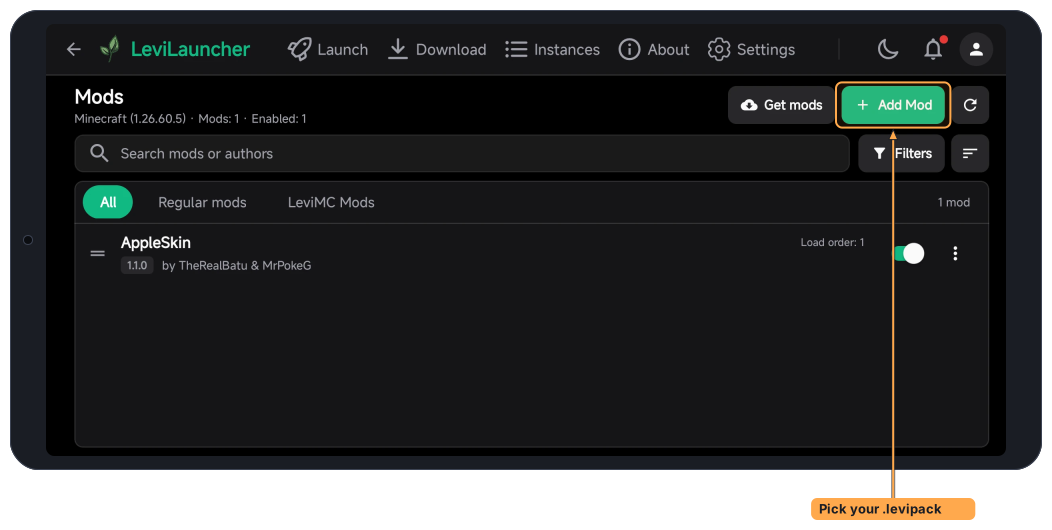
-
You should see My Android Mod in the list of mods, with version
0.1.0and its switch on.
New to LeviLauncher on Android? Play with mods on Android goes through it step by step.
7. Check that it runs
-
Launch the game from LeviLauncher.
-
With the phone connected by USB, read the Android log on the PC:
Windowsadb logcat | Select-String "My Android Mod"Linux and macOSadb logcat | grep "My Android Mod"You should see a line with
Config message: Hello from my first Android mod!. -
Back in LeviLauncher, open the details of your mod. It now has a config: change Message to something else and save. Launch the game again; the log shows the new message.
No adb? Step 3 still works: the config exists only because your mod ran its load() and saved it.
What you have now
- A repository with an Android native mod that builds a
.levipackon your PC and on GitHub. - The mod installed in LeviLauncher, writing to the Android log, with a setting users can change.
Next steps
- The lifecycle in detail: Mod API.
- More settings, with titles, descriptions and limits: Config API.
- Buttons and switches in the game: Mod Menu API. Touch and keys: Input API.
- Change how the game behaves: Hook API, Signature API and Patch API.
- The headers and macros of the SDK: SDK headers and macros.
- A complete example with a Mod Menu, buttons and images:
examples/full-cpp-modin LiteLDev/LeviLauncher-Android. - Native mods in LeviLauncher, from the player's side: Mods & Integrations.
