
How lip works
After this page you know what lip does to a server folder when you ask it for something, why a change is safe to cancel, what the background process of lip is for, and why the interface refuses some things that the commands allow. You do not need any of it to use lip. It helps when something surprises you.
The workspace
A workspace is a folder that holds one server. For the commands it is the folder you are in. For the interface it is the workspace you selected.
A workspace holds two kinds of things:
- The server: the game, the loader, your mods, your worlds and settings. These are ordinary files, where the game expects them.
.lip/: what lip knows about the folder.
In .lip/ | Is |
|---|---|
state.json | The list of installed packages: for each one, its version, where it came from, whether you asked for it, and the files it installed. See State file. |
config.toml | The settings of this workspace. See Configuration. |
lock | The file that lip holds while it changes the workspace. |
server.lock | The file that lip holds while it runs the server. |
journal | The notes of a change in progress. It exists only during a change, or after one was interrupted. |
logs/ | Failure reports. |
wine/ | On Linux and macOS, the Wine prefix of the server. |
Everything lip knows about a server is in its folder. Move or copy the folder, and the server goes with it. Nothing links a workspace to a registry or to a central list, except the list of folders that the interface shows, which is a convenience.
Every file is described in Files and directories.
Game, loader, mods and dependencies
Everything lip installs is a package: a set of files with a description, the lip.toml, that says which files go where and what else the package needs. Packages play four roles in a workspace:
| Role | What it is | How many |
|---|---|---|
| Game | The Bedrock Dedicated Server of Minecraft, in one version, for Windows or for Linux. lip downloads it from Minecraft's own site. | At most one |
| Loader | LeviLamina, which changes the game so that it loads mods. Only for the Windows server. | At most one |
| Mod | A package that LeviLamina loads. It is installed to mods/<name>/. | Any number |
| Dependency | A package that another package needs. | As many as needed |
Two rules follow from this.
The game and the loader are the ground the mods stand on. Each loader version names the game versions it works with, and each mod names what it needs. So lip install and lip update leave the game and the loader alone; they find mod versions that fit them. Only a setup changes the ground, and then moves every mod to a version that fits the new one. A setup is lip setup, or a lip install that names LeviLamina or the game itself.
lip remembers what you asked for. A package you named is yours: it stays until you uninstall it. A dependency is there only because something needs it, and lip removes it when nothing does.
Each package owns the files it installed. No two packages may own the same file, and lip never deletes a file that no package owns, with one exception: a package may name leftovers of its own to clear away when it is removed. The game does this for some of its folders. See What is kept and what is deleted.
Operations
An operation is one change to a workspace: everything a lip setup, lip install, lip update or lip uninstall does, with every dependency it adds or removes. An operation happens completely or not at all.
It goes through these steps:
- Lock. lip takes hold of
.lip/lock. If another lip has it, the operation fails at once. So two changes never mix. - Recover. If an earlier operation was interrupted, lip puts that right first.
- Decide. lip reads what is installed, asks the network which versions exist, chooses a set of packages that fit together, downloads them, and checks that every file can be placed. Nothing in the workspace has changed yet. Most failures happen here, and leave the workspace untouched.
- Prepare the system. If programs for Windows will run, lip makes sure the system can run them.
- Change. lip removes and writes files, and runs the programs that packages ask for. Before each change, it notes it in
.lip/journal. A file that is replaced or deleted is first set aside under a hidden name beside it. - Commit. lip writes the new
state.json, marks the journal as done, then deletes the files it set aside and the journal. - Unlock.
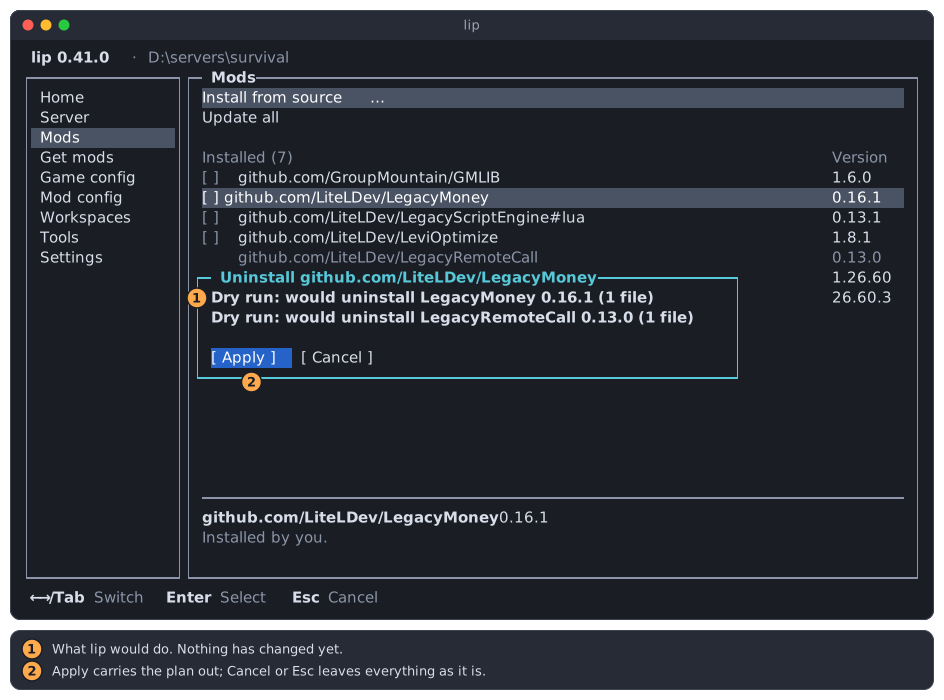
In the interface, the plan you see before Apply is the result of step 3, made without changing anything.
Undo
Because every change is noted before it is made, and every old file is kept until the end, lip can always go back:
- A step fails during the change: lip undoes the changes in reverse order. The workspace and
state.jsonare as before. - You cancel, with Ctrl+C or with Cancel in the interface: the same.
- lip is killed, or the power fails: the journal is still there. The next operation in the folder, or the next
lip run, reads it. If the operation had reached its commit, lip finishes the clean-up. Otherwise it undoes the operation.
One thing is beyond undoing: what a program of a package did while it ran. Authors are asked to write such programs so that running them again does no harm.
Failures are explained on the terminal or in a dialog, and written down in full. See Troubleshooting.
Dry run
A dry run is an operation that stops before step 5. You get one with --dry-run, and the interface makes one before every change to show you the plan.
A dry run is a promise:
- It changes no file: not in the workspace, not in the cache, not in your settings.
- It runs no program and installs nothing on the system.
- It asks no questions. Where the operation would ask, it says so.
- It takes no lock, so it never waits for or blocks another lip.
- It does not repair an interrupted operation. It tells you there is one.
What it does do is everything in step 3, network and downloads included, so its plan is the real plan for the workspace as it is now.
See Dry run for how to use it.
The daemon and its clients
When you run lip install, the program you started does not do the work. It passes the request to a background process, the daemon, and shows you what the daemon reports. The program you started is a client.
The daemon exists for two reasons:
- Servers that outlive the terminal. A process that belongs to a terminal ends with it. The daemon belongs to no terminal, so a server it runs keeps running.
- A shared view. Every interface you open, in any terminal, talks to the same daemon. They all see the same servers and the same list of workspaces.
You do not manage the daemon:
- It starts by itself. The first lip command starts it, when none is running.
- Each user has one. It can be reached only by the user it belongs to: on Windows through a named pipe, elsewhere through a socket file that only you may open.
- A command behaves as if lip ran it directly. It works in your folder, with the environment variables of your terminal, reads your keyboard, writes to your terminal, and ends with the same exit code. Ctrl+C reaches it.
- Commands do not get in each other's way. The daemon carries out the commands of several terminals side by side, each with its own folder and settings.
- It exits by itself after 10 minutes with no client connected and no server running. It never exits while it runs a server.
- It is replaced after an update. A newer lip asks an older daemon to exit and starts its own.
lip daemon status shows whether it runs, and lip daemon stop ends it when it is idle. See lip daemon.
Without the daemon
When a client cannot start or reach the daemon, or the daemon is an older one that is too busy to leave, the client says so and does the work itself. The command does the same thing. Only what needs a lasting background process is missing: managed servers.
See lip carries out the command itself.
Managed servers and the server lock
There are two ways a server runs.
Plain: lip run | Managed: the interface, or lip run --managed | |
|---|---|---|
| Belongs to | The terminal that started it | The daemon |
| When the terminal closes | The server is asked to stop | The server keeps running |
| Its console | That terminal | Every client attached to it, and the Server page of every interface |
| Who can stop it | That terminal | Any attached client, and any interface |
A managed server is a server that the daemon runs for no one in particular. Clients attach to it to see its output and type into it, and detach again without disturbing it. The daemon runs at most one for a workspace.
Whichever way a server runs, the process that runs it holds the server lock, .lip/server.lock. It is what makes "one server per workspace" true: a second start finds the lock held and fails. It is also how lip knows that a server runs when it did not start it itself.
The server lock and the workspace lock are separate. Running a server does not lock the workspace against changes, and changing the workspace does not need the server lock.
The interface and the commands
The interface is not a second program with its own logic. Each thing you do in it is one of the commands, run in the selected workspace, with its output shown in a dialog instead of on the terminal. What a command does is the same either way.
The interface adds caution in one place. While the server of the selected workspace runs, the interface:
- installs, updates and uninstalls nothing there, and sets up nothing there;
- does not save
server.properties,allowlist.jsonorpermissions.json.
It tells you to stop the server first:
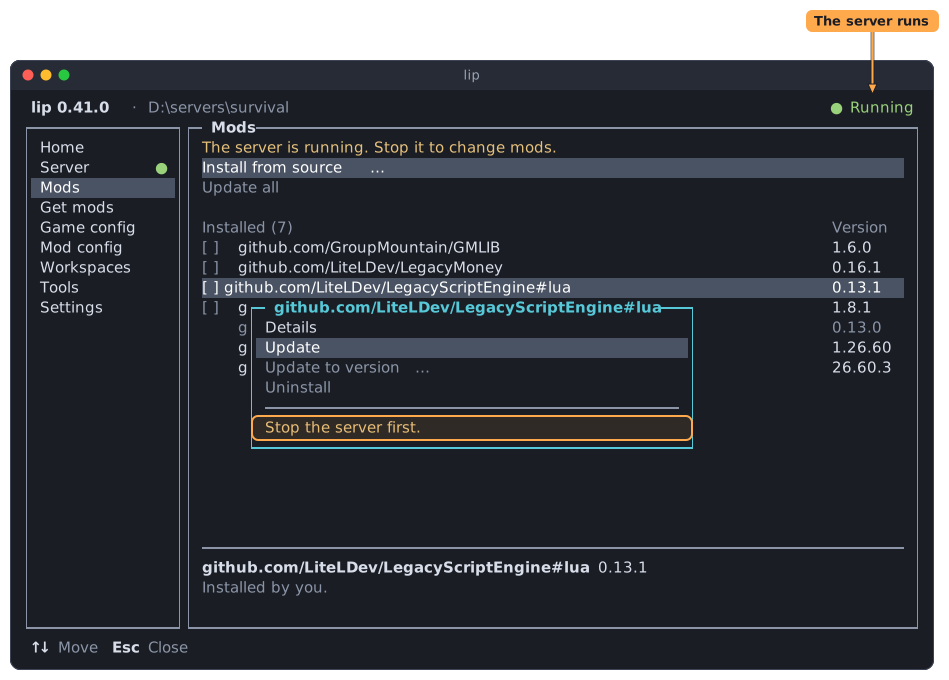
It still saves the settings of mods, which take effect at the next start.
This holds however the server was started: by this interface, by another one, or by a plain lip run in some terminal. The interface finds out through the server lock.
The commands do not refuse. lip install works while the server runs, and the change is safe either way. If a file cannot be replaced because the running server has it open, the operation fails and is undone. If it succeeds, the server picks the change up at its next start.
| While the server runs | Interface | Commands |
|---|---|---|
| Install, update, uninstall, set up | Refused | Allowed. May fail on a file in use, and is then undone. |
| Edit the settings of the game | Shown, not saved | lip has no command for it. Edit the files yourself. |
| Edit the settings of mods | Allowed | The same. |
| Look at what is installed | Allowed | Allowed |
One more difference: the interface starts servers as managed servers, and lip run without --managed does not.
The full mapping from pages to commands is in Interface reference.
Per-user directories
Outside the workspaces, lip keeps four directories for each user.
| Directory | Holds | Windows | Linux and macOS |
|---|---|---|---|
| Config | Your settings, config.toml | %APPDATA%\lip | $XDG_CONFIG_HOME/lip, by default ~/.config/lip |
| Cache | Files downloaded from the web, kept so that they are not downloaded twice | %LOCALAPPDATA%\lip\Cache | $XDG_CACHE_HOME/lip, by default ~/.cache/lip |
| Data | What lip installs to run servers: its Wine, on Linux and macOS | %LOCALAPPDATA%\lip\Data | $XDG_DATA_HOME/lip, by default ~/.local/share/lip |
| State | The list of workspaces of the interface, workspaces.json | %LOCALAPPDATA%\lip\State | $XDG_STATE_HOME/lip, by default ~/.local/state/lip |
What you can safely delete:
- The cache, at any time:
lip cache clean. lip downloads again what it needs. - The data directory, while no lip runs. lip installs Wine again when it needs it.
- The state directory, while no lip runs. You lose only the list of folders in the interface, not the folders.
- The config directory holds only your settings.
On Linux and macOS, the socket of the daemon is in $XDG_RUNTIME_DIR/lip, or in the state directory when that variable is not set. On Windows the daemon uses a named pipe, which is not a file.
Besides these directories, the directory of that socket, the workspaces, and paths you give it, lip writes to one more place: the directory it is installed in, when lip self-update replaces lip. It does not use the temporary directory of the system.
Next
- Internals: how lip finds packages and chooses versions.
- State file and lip.toml: the two file formats.
- Command line: the exact rules of every command.