

BeetrootSkin
AppleSkin-style food and hunger information for Minecraft Bedrock Edition
- Updated
- Visual & HUD
- Utility
README0.1.2
BeetrootSkin

English | 简体中文


Know exactly what your food is worth. BeetrootSkin brings AppleSkin, the much-loved Java Edition mod, to Minecraft Bedrock: food values in tooltips, a preview of what eating will restore, and the hidden saturation and exhaustion made visible on your HUD.
Features
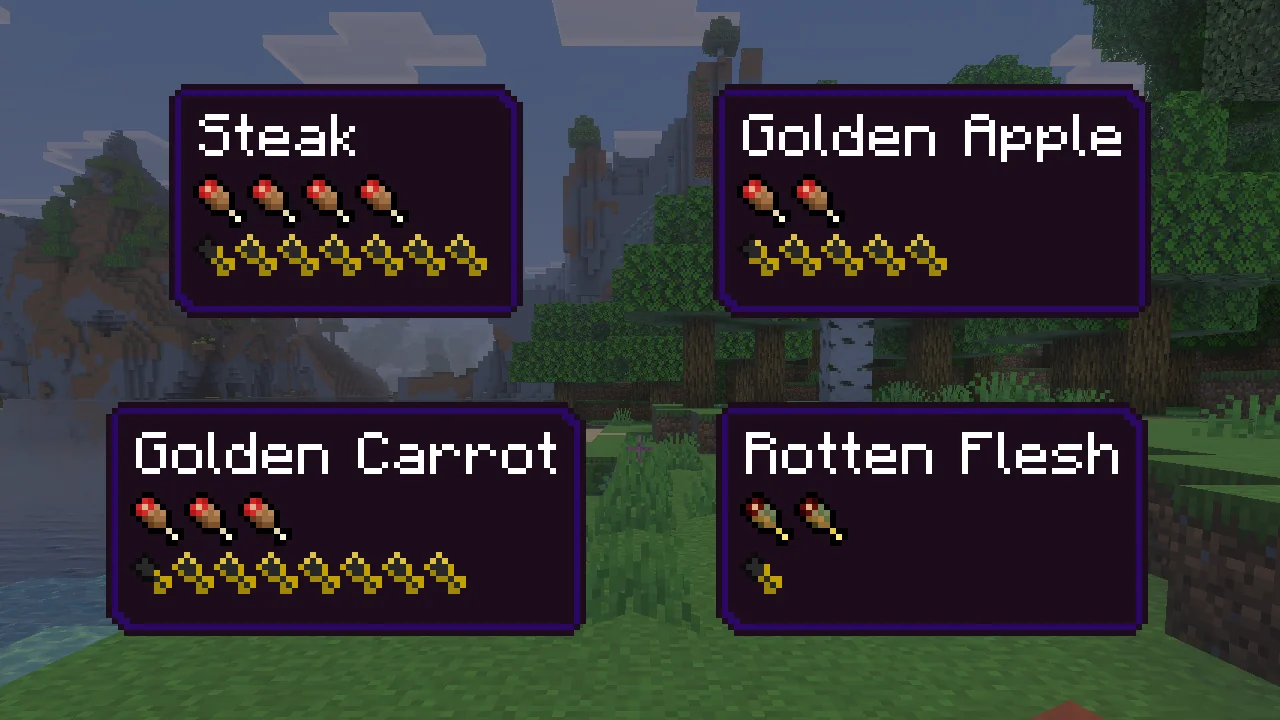
- Food values in tooltips. Hover any food to see the shanks and saturation it gives. Rotten flesh, raw chicken and other risky foods get the green "bad food" icons.

- See what a bite will do. Hold food and the hunger bar flashes the shanks and saturation it would add; the hearts flash the health you would get back, golden apples included.
- Saturation you can see. Golden outlines over your shanks show how much saturation is left before hunger starts to drop.
- Exhaustion you can see. A checkered strip behind the shanks grows as you sprint, jump and fight; when it is full, the next bit of saturation or hunger is used.
- Exact numbers on demand. Press
F6for a line with your precise hunger, saturation and exhaustion.
Works in single-player, in LAN worlds and on servers. Only you need it: nothing is installed on the server.
Install
You need Minecraft Bedrock Edition 1.26.51 for Windows (x64) with LeviLamina 26.51.x, for example set up with LeviLauncher.
With lip:
lip install github.com/MiracleForest/BeetrootSkin#client
Or download beetrootskin-client-windows-x64.zip from the latest release and unzip it so that BeetrootSkin/ lands in the game's mods/ folder.
How to use
Nothing to set up: start a survival or adventure world.
| To see | Do this |
|---|---|
| What a food restores | Hover it in any inventory or chest |
| What eating it would do right now | Hold it (main hand or offhand) |
| Your saturation and exhaustion | Just look at the hunger bar |
| Exact hunger, saturation and exhaustion | Press F6 (remap it in Settings → Keyboard & Mouse) |
Settings
Everything is on by default. To change it, edit mods/BeetrootSkin/config/config.json; changes apply within a second, even while you play. The names are AppleSkin's.
| Option | Default | What it does |
|---|---|---|
showFoodValuesInTooltipAlways | true | Set to false to show food values only while you hold Shift. |
showFoodValuesInTooltip | true | Food values in tooltips while Shift is held. |
showFoodValuesHudOverlay | true | Flash the hunger and saturation the held food would restore. |
showFoodValuesHudOverlayWhenOffhand | true | Also preview food in your offhand. |
showFoodHealthHudOverlay | true | Flash the health the held food would restore. |
showSaturationHudOverlay | true | Golden saturation outlines on the hunger bar. |
showFoodExhaustionHudUnderlay | true | The exhaustion strip behind the shanks. |
showVanillaAnimationsOverlay | true | Let the overlays shake along with the hunger bar. |
maxHudOverlayFlashAlpha | 0.65 | How strong the flashing previews get, from 0 to 1. |
showFoodDebugInfo | false | The exact-numbers line (what F6 toggles). |
Bedrock heals differently from Java (a steady regeneration while hunger is 18 or more), so the health preview follows Bedrock's rules and can differ from AppleSkin on Java.
More
More screenshots and videos: https://levimc.org/mods/github.com/MiracleForest/BeetrootSkin/?tab=gallery
Building it yourself or writing a mod against it? See CONTRIBUTING.md.
License
LGPL-3.0-or-later © LeviMC. The HUD and tooltip icons are AppleSkin's, by squeek502, released under the Unlicense (NOTICE). Not affiliated with Mojang Studios, Microsoft or the AppleSkin project.