

BarelyEnoughItems
A JEI-style item list and recipe viewer for Minecraft Bedrock Edition
- 5 stars
- Updated
- Utility
README0.1.3
BarelyEnoughItems (BEI)



Never alt-tab to a wiki again. BEI puts every item in the game next to your inventory, and shows how to make it and what it is good for — Just Enough Items (JEI) from Java Edition, now on Minecraft Bedrock for Windows.
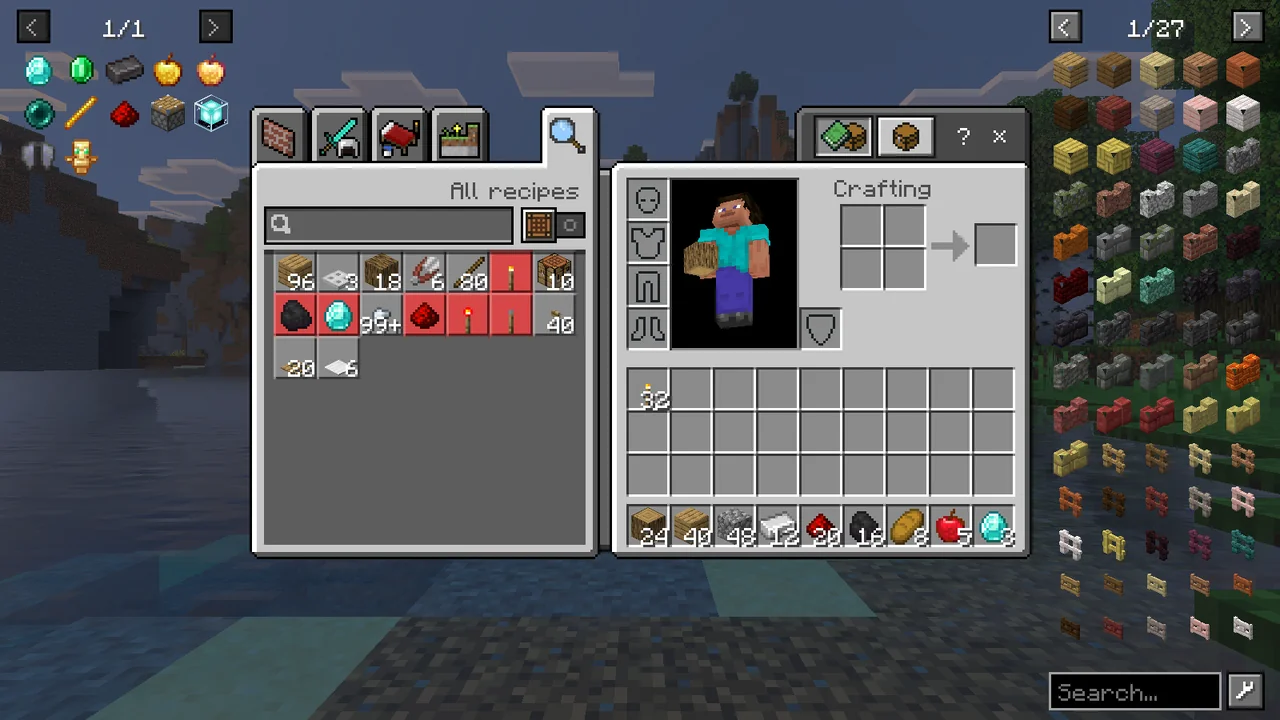
Features
- Every item at hand — a searchable item list beside the inventory, crafting table, furnace, chest and every other container.
- Recipes and uses — press
Ron any item to see how to make it,Uto see what it is used for: crafting, smelting, smithing, stonecutting, brewing, anvil repair, composting and more. - One-click crafting — the
+button moves a recipe's ingredients from your inventory into the crafting grid or furnace. - Smart search — filter by name, tag, namespace or id, exclude words, and search Chinese names by pinyin.
- Bookmarks — pin the items you keep looking up to a list on the left.
- Cheat mode — with cheats on, click an item to take a stack.

BEI only runs on your game: it works in single-player and on any server, and the server does not need it.
Install
You need Minecraft Bedrock Edition 1.26.51 for Windows (x64) with LeviLamina 26.51.x, for example installed through LeviLauncher.
With lip 0.35.0 or later:
lip install github.com/MiracleForest/BarelyEnoughItems#client
Or download bei-client-windows-x64.zip from the latest release and extract it so that the BEI folder lands in the game's mods/ folder.
How to use

Open your inventory or any container. The item list is on the right, your bookmarks on the left.
| Key / click | What it does |
|---|---|
R or left click | Recipes for the item under the mouse |
U or right click | Uses of the item under the mouse (on a furnace or other workstation: everything it makes) |
+ next to a recipe | Move the ingredients into the open crafting grid, furnace or smithing table. Shift-click moves as many as you can make. Missing ingredients turn red. |
A | Add or remove a bookmark |
Backspace | Back to the previous recipe page |
O | Show or hide the item list |
Ctrl + F | Jump to the search bar (↑ ↓ bring back earlier searches, right click clears it) |
Mouse wheel, < > | Turn pages |
The keys work over the item list, over your own inventory slots and inside the recipe page, and you can change them in Settings → Keyboard & Mouse. In the recipe page, click a tab to switch category, click an ingredient for its recipes (right click for its uses), and click a workstation on the left to see everything it makes.
Search
| Type | To find |
|---|---|
oak planks | Items whose name contains both words |
stone|dirt | Either word |
-slab | Everything except slabs |
@minecraft | Items from one namespace (mod or add-on) |
#planks | Items with that item tag |
$oak_ | Items whose id contains the text |
"red wool" | That exact phrase |
mb, muban, 木板 | Chinese names by pinyin initials, full pinyin or characters |
Cheat mode
If you may use commands (operator, or cheats enabled in the world), Ctrl-click the settings button next to the search bar. The button turns red, and clicking the list gives you items: left click a stack, right click or Shift-click one. In creative mode, clicking the list while holding an item deletes it.
Settings
Click the settings button next to the search bar:
| Option | |
|---|---|
| Cheat mode | Click items in the list to take them |
| Bookmark panel | Show the bookmarks on the left |
| Add new bookmarks to the front | Newest bookmark first |
| Search bar under the container | Center the search bar below the inventory |
| Show item ids / mod name in tooltips | Extra tooltip lines |
| Remember the item list page | Reopen the list where you left it |
| Show on all container screens | Off: only on the inventory and the crafting table |
| Max columns | Make the item list narrower |
Settings and bookmarks are saved in mods/BEI/config/ (config.json, bookmarks.json).
More
More screenshots and videos: https://levimc.org/mods/github.com/MiracleForest/BarelyEnoughItems/?tab=gallery
Found a bug or have an idea? Open an issue. Building it yourself or contributing? See CONTRIBUTING.md.
License
LGPL-3.0-or-later © LeviMC. BEI is not affiliated with Mojang Studios, Microsoft or the JEI project.